Procurement Copilot Workflow Diagram
This page now shows the workflow as one simple static diagram so it is easier to explain live: route the request, follow one of three paths, and end in a supported outcome.
One diagram, three routes, four outcomes
The diagram below is authored from a Mermaid source file and rendered as a static SVG so the page stays clean, readable, and reliable during demos.
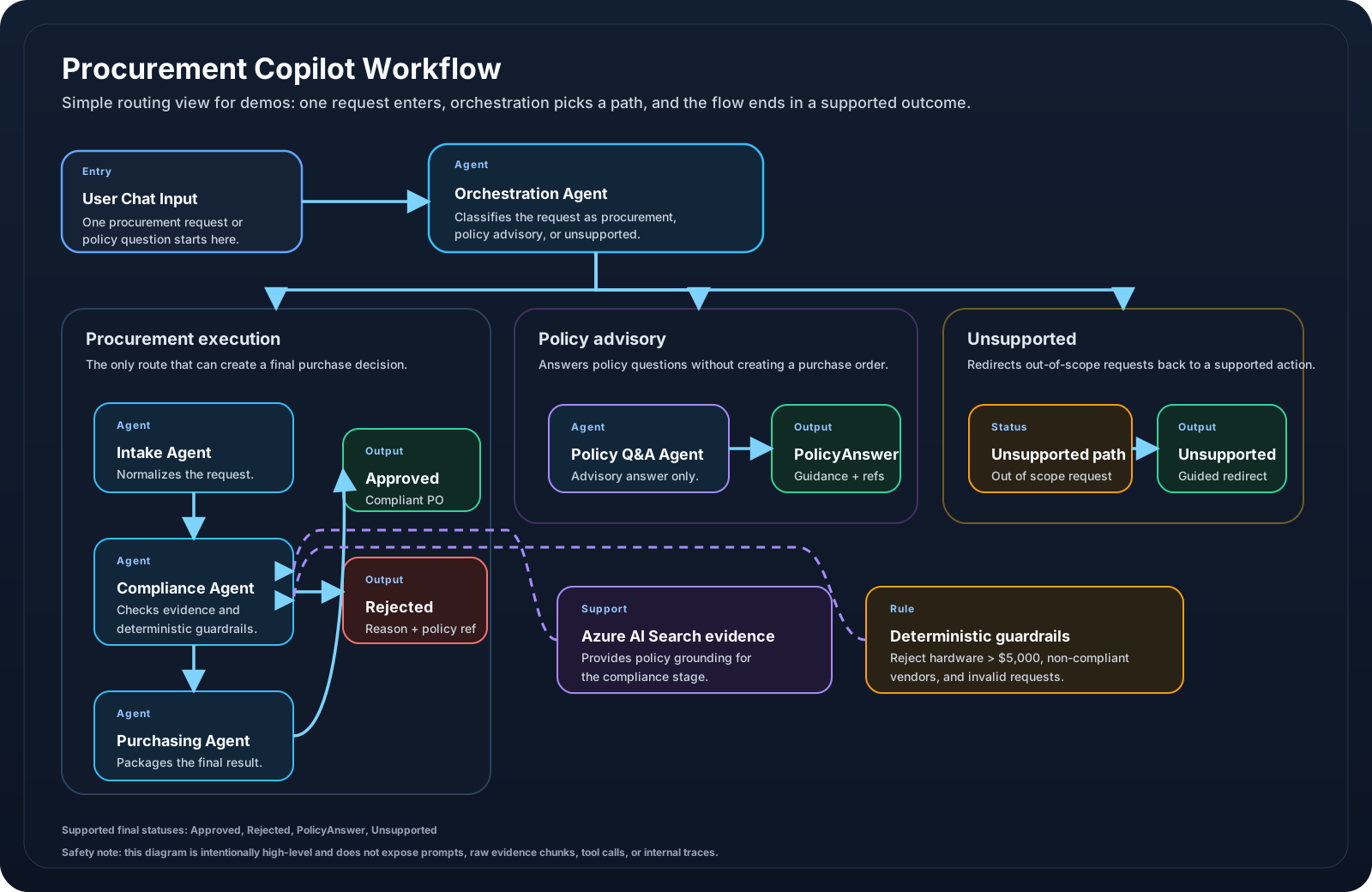
docs/diagrams/workflow-diagram.mmd and shown here as a static image for clarity.
How to explain it quickly
Start with one chat request.
The orchestration stage picks the correct path.
Only the procurement path can create Approved or Rejected outcomes.
Policy questions stay advisory and unsupported requests are redirected.
What the audience should remember
Procurement execution
Intake → Compliance → Purchasing → Approved or Rejected
Policy advisory
Policy Q&A → PolicyAnswer with references only
Unsupported fallback
Unsupported → guidance back to a supported task
Guardrails
Hardware over $5,000, non-compliant vendors, and missing required fields block approval